Stop Searching, Start Selling: Track Local Grain Bids Easily with Gradable
The Markets section of the Gradable app is built to serve as your ultimate grain marketing command center, putting the exact data you need right at your fingertips.
ByDahn Clemens·Jun 4, 2026
Gradable Resources
Markets at Your Fingertips: How the Gradable Markets Section Keeps ADM and POET Growers Ahead
As a grower, your day is packed with operational decisions. Keeping a constant eye on fluctuating local grain markets shouldn’t require constantly checking multiple sites, scrolling through endless search results, or making tedious phone calls.
Whether you deliver to just one primary location within the ADM or POET networks, manage grain across multiple facilities within a single partner's network, or coordinate deliveries across both networks simultaneously, staying on top of your local markets is easier than ever.
The Markets section of the Gradable app is built to serve as your ultimate grain marketing command center, putting the exact data you need right at your fingertips.
The Heart of the Markets Section: Favorite Bids
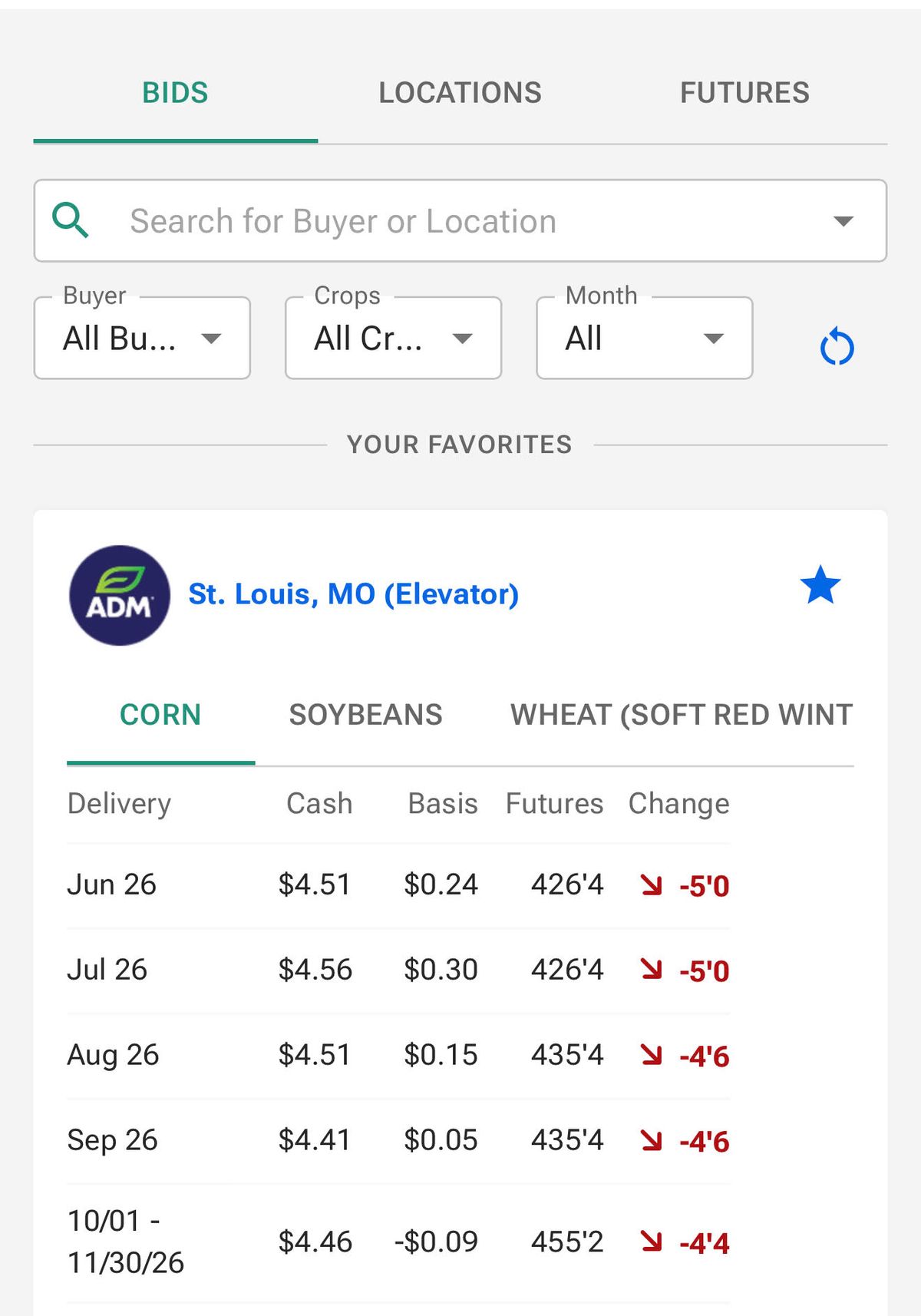
Designed to cut through the noise, the Markets section centralizes cash bids, delivery periods, and market information from your key integrated partner locations. By prioritizing your most important locations, the app builds a personalized, consolidated dashboard dedicated strictly to the facilities you actually use.
Getting Started: Automatic Setup & Customization
We’ve made setting up your customized workspace incredibly straightforward. In fact, you may not have to lift a finger:
The Automatic Advantage: If you sign a contract with an ADM or POET location, the Gradable app automatically favorites that specific facility for you. Your active business history ensures your key locations are highlighted from day one.
Customize Your Workspace in Seconds: Want to add more locations manually? You can build your tailored view in three quick steps:Need to clean up your list? Removing a location is just as easy—simply tap the solid blue star again to un-favorite it.
Tap on the Market icon at the bottom of your screen and head to the Bids or Locations tab at the top.
Use the search bar to search for your desired ADM or POET delivery location.
Tap on the location in the search results to open it, and then tap the unfilled star on the screen. The star will turn solid blue, instantly adding that location to your Favorites list.
Once your favorites are set, you'll enjoy Tailored Views where you instantly see spot pricing, delivery periods, and futures details from only your specific ADM or POET locations. (Note: All posted bids and futures prices are displayed on an industry-standard 10-minute delay).
Where to Find Your Market Information
Once set up, you can access your personalized list in two ways depending on how much detail you need:
The Quick Check: Look at the middle of your Market Home screen to see prices for your two closest geographically favorited locations. Tap "View All Markets" to expand this to your complete list.
The Deep Dive: Tap the Market icon on the bottom menu. The app automatically defaults to the Bids screen, which defaults directly to your favorite locations. From here, simply select your desired location to instantly see all of its posted delivery periods, spot pricing, and additional location information.
Beyond the Bid: Powerful Tools in Your Markets Section
Because ADM and POET are fully integrated partners, navigating the Markets section unlocks a suite of powerful, location-specific tools that go far beyond physical coordinates:
1. Track Markets with the Futures Tab & Dynamic Charting
Right in the Markets section where your favorite bids are located, you can easily tap over to the Futures tab.
From here, you can view the current pricing of all your favorite commodities on an industry-standard 10-minute delay. The tab features dynamic charting, allowing you to interactively track market trends, study price movements over time, and visualize futures contracts directly alongside your local cash bids.
2. Access Vital Buyer Info & Announcements
Stay connected to your local scales without playing phone tag. By selecting your desired ADM or POET location from your Favorites list, you can expand the details to view:
Real-time Announcements: Important updates directly from the facility (e.g., harvest hours, moisture discounts, truck line updates, or operational delays).
Logistics Details: Physical address, operating hours, direct staff contacts, and receiving information.
Get Started Today
Take control of your grain marketing workflow. Open your Gradable app today, head to the Markets section, star your core ADM and POET delivery locations, and start saving time on every trade.
Have questions about syncing your partner account? Reach out to our support team or contact your local ADM or POET representative to get fully integrated.
GEnd of article · Gradable Resources · Vol. 02 · Spring 2026
About the byline
Dahn Clemens
Customer Success Lead
Dahn Clemens oversees commercial customer success at Gradable, bridging the gap between traditional agribusiness and modern AgTech. He holds a degree in Agricultural Economics from the University of Nebraska-Lincoln and brings valuable, hands-on industry experience from his previous roles in grain origination and merchandising distiller grains.